How to use AI to check if a text or email is a scam
A copy-ready prompt that gets an AI assistant to point out the pressure tricks in a suspicious text or email and tell you how to check it, without pretending it can tell you who sent it.
Check a message for scam signs
I got this [type] that says it's from [who it claims to be]. I haven't tapped any links or replied, and I've replaced my personal details with [REMOVED]. Please: (1) tell me in one sentence what the message wants me to do; (2) list every warning sign you can see, quoting the words, and say why each one is a common scam tactic; (3) list anything in it that a genuine message from that sender might also contain; (4) tell me how to check it without using any link, phone number or reply address in the message. Don't tell me it's safe or that it's definitely a scam: you can't see where links go or who really sent it, so tell me what to check myself. The message: [PASTE MESSAGE]
Tap a blank to fill it in, or copy it as it is.
A text about a parcel fee, an email saying your account is locked, a "fraud alert" asking you to reply Y or N: some are real, plenty are not, and they're written to make you act before you think. An AI assistant (a chat program such as ChatGPT, Claude, Gemini or Copilot) is useful here as a second pair of eyes. It reads the wording calmly, points out the pressure tricks and tells you exactly what to check. What it can't do is tell you who sent the message. Only the company itself can, through a route you found yourself, so this prompt asks the assistant for warning signs and a way to check, never for a verdict.
If you've already tapped a link, paid or typed in a password or code, stop here and ring your bank on the number on the back of your card, then change that password. The checking can wait.
What you need
- The message, still unopened in the sense that matters: you haven't tapped the link or replied.
- Any AI chat assistant. The free version is fine. If you haven't picked one yet, our 10-minute test for choosing an assistant helps.
- The company's own app, or a card, statement or order confirmation that has its real contact details.
Step by step
- Don't tap anything in the message. On a phone, press and hold the text and choose Copy; in an email, select the words and copy them.
- Paste the message somewhere you can edit it, such as a notes app, and replace your name, address, card digits, account numbers, tracking numbers and any codes with [REMOVED]. Keep the web address the message shows, minus anything after a "?" that might identify you: the address itself is often the biggest clue.
- Fill in the prompt, paste the edited message at the end and send it.
- Read the "what it wants me to do" line first. Pay, log in, reply, call a number, install something: that's what the message is really for.
- Go through the warning signs, then the list of things a genuine message would also have. Both lists matter. A real bank alert can look a lot like a fake one, which is why the next step exists.
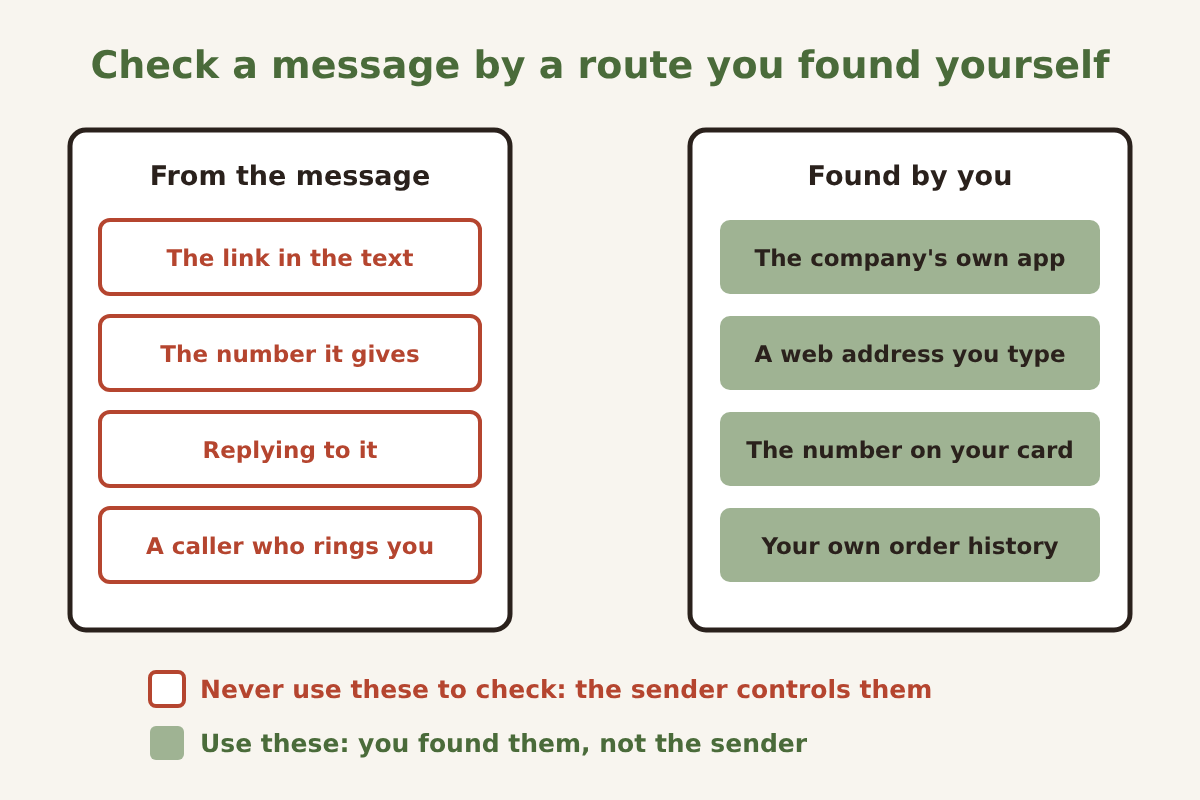
- Check through a route you found yourself: open the company's app, type its web address, or call the number printed on your card or statement. Ask whether the message came from them.
- If it turns out to be a scam, report it and delete it. In the UK, forward scam texts to 7726 (it's free) and scam emails to report@phishing.gov.uk, as GOV.UK explains. In the US, report it to the Federal Trade Commission at ReportFraud.ftc.gov.
What a good answer looks like
A good answer starts with one plain sentence, such as "It wants you to open the link and pay £1.45 within 24 hours." Then it quotes the message bit by bit: "returned to sender if not paid within 24 hours" is a deadline meant to stop you checking; a web address with delivery words in it but no carrier's name is a lookalike pattern; "Pay now" skips any way to identify the parcel first.
The list of genuine features is what keeps the answer honest. For a delivery text it should say that real carriers do sometimes charge fees and send failed-delivery notices, so none of those details settles anything. For a bank alert it should notice what's missing, such as a link or a request for your PIN, without calling that proof.
The checking advice should send you to places the sender doesn't control: the retailer's order page, the carrier's own app, the number on your card. If it suggests calling a number or visiting an address from the message itself, it has got the main point wrong.
Where it goes wrong
- It can't see where a link really goes. The text of a link and the page it opens can be different. The assistant reads only the words you pasted, so a clean-looking address proves nothing. Don't ask an assistant that can browse to "open it and check" either: a fake page can look exactly like the real one.
- It can be fooled by good writing. Old advice says scams are full of spelling mistakes. Many now aren't, and an assistant comparing the wording to what it has seen before can find nothing odd in a well-written fake. "I see no warning signs" is not the same as "this is real".
- It treats the sender's name as a clue. Scammers can make a text appear under a bank's name, sometimes in the same thread as genuine messages. Check that the assistant says so rather than counting the name in the message's favour.
- Its advice on what to do next can be out of date or wrong for your country. Reporting numbers and fraud services differ between countries. Check them against your government's or your bank's own website.
- A verdict slips in anyway. Asked "Is this a scam?", assistants often answer yes or no. For an obvious parcel-fee fake that's usually right, but for a convincing bank alert a confident "it looks genuine" is exactly what a scammer hopes for. Whatever it says, do step 6.
Parcel texts are among the most common of these. If you've already tapped one, what to do after tapping a fake delivery text walks through each step.
Keep it private
The assistant needs the wording, not you. Before pasting, take out your name, address, phone number, email address, any card or account digits (even the last four), tracking and order numbers, and any reference number after a "?" in a web address. Never paste a one-time code, password or PIN into a chat, and never type one into a page the message sent you to. Don't upload a screenshot of the whole message: it can carry your contact name, number or other messages around it. For a fuller list, see what you should never paste into an AI chatbot.
If the "message" is a call or voice note from someone who sounds like a family member asking for money, there's nothing to paste. Hang up and ring them back on the number you already have.
Tested with
We ran this prompt with OpenAI's GPT-6.2 Sol model (gpt-6.2-sol, through OpenAI's API) in November 2026 on two made-up texts: a parcel notice asking for a £1.45 fee within 24 hours through a lookalike web address, and a bank alert asking the reader to reply Y or N about a £249.99 card payment. For the parcel text it quoted each pressure point, noted that the address named no carrier, and said real carriers do sometimes charge fees, so the fee alone settles nothing. It sent the reader to the retailer's order page and the carrier's own app. For the bank alert it said a bank's name in a text can be faked and that a one-letter reply could set up a follow-up call from someone posing as the fraud team. It added that a blocked payment might not show in the app, so calling the number on the card is the real check.
With the short version ("Is this a scam?"), it called the parcel text very likely a scam and mentioned 7726, and said the bank alert could be genuine but couldn't be judged from the text alone. Those answers were sound, but each was a few lines with no list of what a genuine message would also contain, so they taught less about spotting the next one.
