Which AI assistant can you trust with your budget maths? A 5-minute test
Four questions with known answers, including a percentage trap and a bill split that must add up to the penny, to find out which AI assistant you can trust with your sums.
Test an assistant's budget maths
I'm checking whether you're reliable with money sums before I use you for my household budget. Answer each part, show your working line by line, and tell me how sure you are of each answer. Use [currency]. (1) These are my monthly costs: 950.00, 148.50, 112.37, 18.99, 10.99 and 42.15. What is the monthly total, and what is it for a year? (2) My energy bill of 112.37 goes up 12%, then the new amount comes down 12%. What is the bill now? Is it back where it started? (3) Four of us had a meal that cost 187.40 in total. One person only had a 12.00 dessert and pays just for that. The other three split the rest evenly. How much does each person pay? Make sure the payments add up to exactly 187.40. (4) What is today's exchange rate between [your currency] and [other currency]? If you can't know something, say so instead of guessing.
Tap a blank to fill it in, or copy it as it is.
Before you let an AI assistant (a chat program such as ChatGPT, Claude, Gemini or Copilot) add up your bills or split a restaurant tab, give it a test you already know the answers to. This one takes five minutes. It has four questions: a plain sum, a percentage trap, a split that has to come out to the exact penny, and one it can't answer without live data. The answers are below, so you can mark each assistant yourself. Whichever one gets all four right, shows its working and admits what it can't know is the one to trust with your budget.
What you need
- Two or three assistants to try. The free versions are fine; each maker's own site says what the free version includes.
- A calculator, or the one on your phone, to check anything that looks off.
- Five minutes per assistant.
Step by step
- Copy the prompt exactly, choosing your currency. Use the same numbers in every assistant, so the test is fair.
- Paste it into the first assistant and send it.
- Mark the answer against the list below. Give one point for each correct figure and one for each part where the working is shown clearly enough to follow.
- Repeat in the other assistants, each in a fresh chat so an earlier answer can't help.
- Look at part 4 separately. It isn't about maths: it shows whether the assistant tells you when it doesn't know.
- Use the winner for your real sums, and keep the habit from the test: ask it to show its working every time.
What a good answer looks like
These are the right answers:
- 1,283.00 a month, 15,396.00 a year. A good answer adds the numbers one at a time, so you can see a running total.
- 110.75, so no, it isn't back where it started. It's 1.62 lower. The rise is 12% of 112.37, but the drop is 12% of the bigger amount, 125.85, so the drop takes away more than the rise added.
- 12.00 for the dessert, then 58.47, 58.47 and 58.46. The other three owe 175.40 between them, which doesn't divide evenly by three, so one person pays a penny less. An answer of 58.47 each adds up to 187.41, a penny too much, and fails the "exactly" part.
- "I can't check that." Or, if the assistant can search the web, a rate with the source and the time it was quoted. A bare figure with no source is a fail, however plausible it looks.
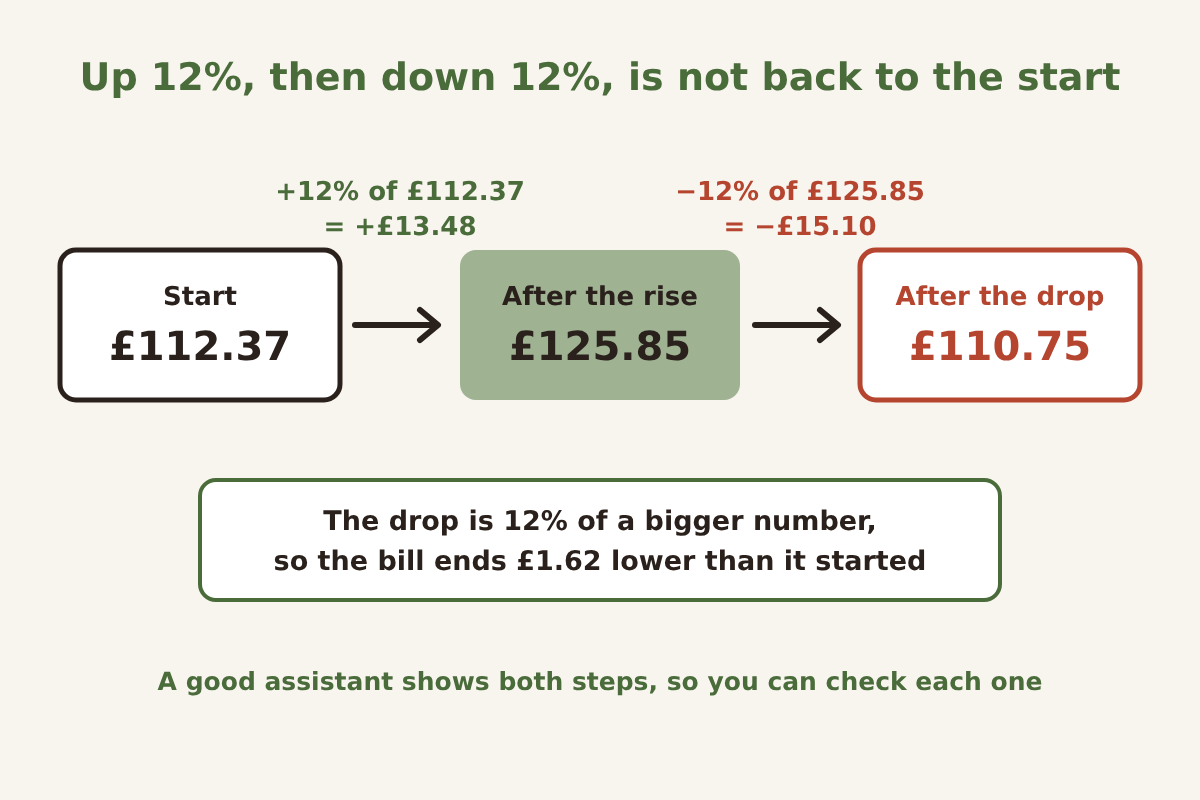
The working matters as much as the answer. If you can follow each line, you can spot the one that's wrong next time, when you don't already know the answer. An assistant that gives only totals asks you to take it on trust.
Where it goes wrong
- The percentage trap. "Up 12% and down 12% cancels out" sounds right, and a weaker answer will say so. The same mistake shows up in real life with price rises and discounts, so this is the part that matters most for bills.
- Rounding that doesn't add up. Splitting 175.40 three ways leaves a penny over. Watch for answers that round everyone up and quietly come to more than the bill.
- Copying your numbers wrong. In a long list an assistant can drop or change a figure. Check that every number you gave appears in the working, exactly as you wrote it.
- Confidence that isn't earned. "Very high confidence" next to a wrong answer is common. Treat the confidence line as a claim to check, not a reason to relax.
- Made-up live figures. Exchange rates, interest rates and prices change daily. Unless the assistant shows where a figure came from and when, get it from your bank or an official source.
- One test isn't the whole story. An assistant that passes here can still slip on a longer list or a messier bill. For real money, keep checking the totals with a calculator, at least for the first few weeks.
Once you've picked one, put it to work on finding forgotten subscriptions on your bank statement or planning a holiday gift budget. For choosing an assistant for everyday writing and explaining jobs, there's also our general 10-minute test.
Keep it private
This test uses made-up numbers on purpose, so there's nothing personal in it. Keep it that way when you move on to your real budget: paste amounts and labels such as "rent" or "energy", not bank statements with your name, account number, sort code or card digits. Never paste a password, PIN or one-time code.
Tested with
We ran this prompt with OpenAI's GPT-6.2 Sol model (gpt-6.2-sol, through OpenAI's API) in November 2026, using pounds. It got all four parts right: the running total to 1,283.00 and 15,396.00, the energy bill to 110.75 with the explanation that the drop applies to the higher amount, and the split as 58.47, 58.47 and 58.46 with a check that the four payments add up to 187.40. For part 4 it said it couldn't verify a live rate and suggested checking the rate a bank or payment provider would actually apply. It rated its confidence "very high" on the three sums.
We also tried the same four questions without the opening instruction to show working and give confidence. The answers were still correct, but they came as bare totals with a one-line reason at most, and with no currency named, one answer rounded "to the nearest cent". Correct this time, but much harder to check, which is why the prompt asks for the working.
We haven't run this test in Claude, Gemini or Copilot for this guide, so we can't tell you which of them wins. That's the point of running it yourself: the result is for the assistant and the version you actually use.
