How to use AI to find forgotten subscriptions on your bank statement
A copy-ready prompt that finds every repeating charge in your transactions, adds up what they cost and flags price rises, double charges and trials that turned paid.
Find the subscriptions on my statement
Here are [how many] months of transactions from my [bank statement / card statement], copied as text with account numbers removed. Find every subscription: the same company charging about the same amount every week, month or year. For each one, list the name as it appears on the statement, the amount, how often it seems to charge, the dates you saw it, and what it probably is if the name is unclear (say when you are guessing). Then add up what they cost per month and per year, showing the sum. Flag any that went up in price, any that seem to be charged twice, and any free trial that turned into a paid charge. List rent, loan, utility and phone bills separately and leave them out of the total. Don't tell me which ones to cancel. Transactions: [PASTE TRANSACTIONS]
Tap a blank to fill it in, or copy it as it is.
Small monthly charges are easy to stop seeing. A streaming service here, cloud storage there, a free trial you forgot to cancel, a news site that quietly went up by a few dollars. An AI assistant (a chat program such as ChatGPT, Claude, Gemini or Copilot) is good at reading a long list of transactions and pulling out the ones that repeat. It does the spotting and the adding up. You decide what to keep, and you cancel things yourself.
What you need
- An AI chat assistant. The free version is enough for this.
- Your transactions as text: the date, the description and the amount for each line. Most banks let you download them as a spreadsheet or CSV file from online banking, or you can copy them from a statement page.
- Three months of transactions at least. Twelve is better, because yearly charges only show up if they fall inside the months you paste.
Step by step
- Download or copy your transactions for the months you want to check. Copy just the transaction list, not the top of the statement.
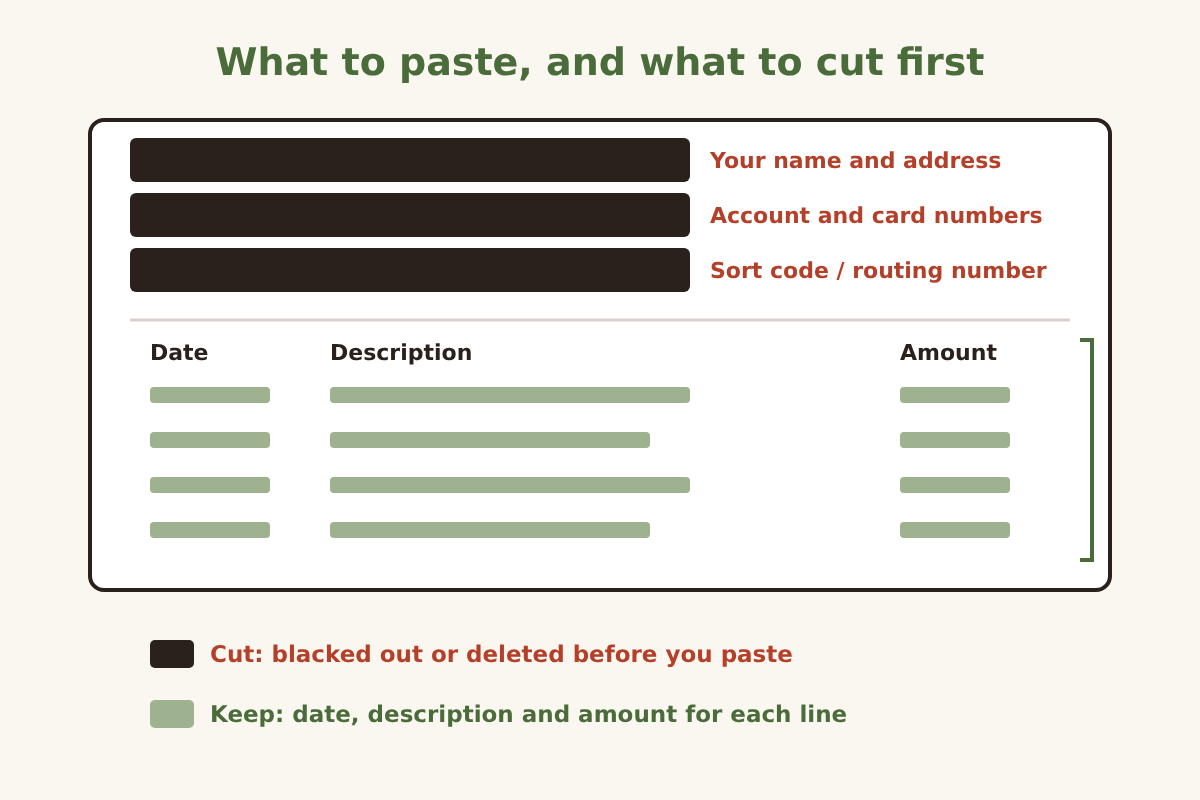
- Delete your name, address, account number, card number and sort code or routing number before you paste anything. Keep only the date, description and amount for each line.
- Fill in the prompt and paste the transactions where it says PASTE TRANSACTIONS.
- Read the list it gives back next to your statement. For every subscription, find the lines yourself and check the dates and amounts match.
- Check the sum. Add the monthly amounts on a phone calculator; it takes a minute and catches the rare slip.
- Look into anything flagged. A charge that appears twice in one month might be two separate plans (one for you, one for a family member) or a real double charge. Your bank or the company can tell you which.
- Cancel what you no longer want through the company's own website or app, or ask your bank how to stop a recurring card payment.
What a good answer looks like
A good answer starts with the total: how much your subscriptions cost per month and per year. Then a table, one row per subscription, with the name exactly as it appears on your statement, so you can find it again. The sum is written out line by line, not just given as a number. Price rises, possible double charges and free trials that turned paid each get their own short note, with the dates.
Rent, utility and phone bills appear in a separate list and stay out of the subscription total. If the assistant guesses what a cryptic name like "PPNEWSDAILY" is, it says so. ("PP" at the start of a description often means the payment went through PayPal, but your bank's own description is the one to trust.)
Where it goes wrong
- It can only see what you paste. A yearly subscription that renewed eight months ago won't appear in three months of transactions. Paste twelve months if you can, or search your statements for the names of anything you know you pay for once a year.
- Bills mixed in with subscriptions. Without the line about rent and bills, our first test counted rent and the water bill as "recurring payments" and gave a monthly total over $1,400 for what was really under $100 of subscriptions. Keep that line in the prompt.
- Wrong guesses about what a charge is. Statement descriptions are often cut short or use a parent company's name. Treat the assistant's guess as a lead, not an answer. Look the charge up in your banking app (many show the merchant's full name) or ask your bank.
- Arithmetic slips. The totals were right in our tests, but check them anyway. A sum you didn't check is a sum you can't rely on.
- "Duplicate" isn't always a mistake. Two charges from the same company can be two plans. Before you dispute anything, check your accounts with that company. If it really is a double charge, contact the company first, then your bank.
The assistant can't cancel anything for you, and it can't tell you whether a cancellation fee or notice period applies. That is in the company's terms, which you can check on its website or by asking it directly.
Keep it private
The assistant doesn't need to know who you are to find repeating charges. Before pasting, delete your name, address, account number, card number and sort code or routing number. Transfers to people can name a friend or family member; replace their names with something like "TRANSFER TO FRIEND". Never paste online banking passwords, PINs or one-time codes into any AI chat. Our guide to what never to paste into an AI chatbot has the full list.
If you find a charge you never agreed to and the company won't refund it, our guide to writing a refund complaint letter with AI helps you put the request in writing. If your transactions are already in a spreadsheet, you can also get AI to write a formula that totals each merchant for you.
Tested with
We ran this prompt with OpenAI's GPT-6.2 Sol model (gpt-6.2-sol, through OpenAI's API) in November 2026, on three months of made-up transactions that included rent, a water and power bill, a phone plan, one charge labelled as annual, and six monthly subscriptions, among them a news subscription that went from $4.99 to $7.99, a music service charged twice a month, and a free photo-editing trial that became $9.99 a month. Two runs gave the same answer: all seven subscriptions found, all three flags raised, bills listed separately, and the sums correct ($88.44 a month in monthly charges, $1,121.27 a year with the annual one). Our first version of the prompt didn't have the line about bills, and it put rent and utilities in the total. Just asking "Which of these are subscriptions?" found the same services and noticed the double music charge, but gave no totals at all.
