How to use AI to plan the cooking timeline for a holiday dinner
Give an AI assistant your menu, your oven and the time you want to eat, and it works backwards to an hour-by-hour plan that flags where two dishes fight over the oven.
Plan the cooking timeline for a big dinner
I'm cooking [meal] for [people] people and want to eat at [serving time]. The menu: [dishes, for example: roast turkey, stuffing, mashed potatoes, green beans, gravy, pumpkin pie]. My kitchen has [oven] and [hob]. The main is [main and its weight, for example], and the recipe or label I'm following says [cooking time from your recipe or label: …]. Work backwards from serving time and give me a timeline: what to do the day before, then hour by hour on the day, with oven temperature changes and what goes in and out of the oven when. Flag any point where two dishes need the oven at different temperatures. Don't give me safe internal temperatures; I'll check those myself.
Tap a blank to fill it in, or copy it as it is.
The hard part of a big dinner is rarely any one dish. It's getting six of them hot at the same moment out of one oven. An AI assistant (a chat program such as ChatGPT, Claude, Gemini or Copilot) is good at exactly this: give it your menu, your kitchen and the time you want to eat, and it works backwards to a timeline that says what goes in the oven when, what can be done the day before, and where two dishes will fight over the oven.
What it shouldn't decide is how long your bird or joint needs or when it's safely cooked. Those come from your recipe or the label, and from a meat thermometer, which is why the prompt asks you to supply the cooking time and tells the assistant to leave safety temperatures out.
What you need
- Any AI chat assistant. The free version is fine.
- Your menu, and the recipes or labels for the main and anything else that goes in the oven.
- An honest count of your kit: how many ovens, how many burners, a slow cooker or microwave you can use.
- A meat thermometer, if you're roasting a bird or a joint.
Step by step
- Write down the menu and find the cooking time and oven temperature for each oven dish in its own recipe or on its label.
- Fill in the prompt, including the cooking time for the main. Leave it out and the assistant fills the gap with its own estimate.
- Send it, then read the timeline from the end backwards: does everything land by serving time?
- Give it your recipes' oven temperatures if it assumed any. Write "My stuffing recipe says 190°C for 40 minutes, redo the plan" and it will rework the swap.
- Ask for a shorter version to stick on the fridge: "Turn this into a list of times and jobs only, one line each."
- On the day, go by the dish, not the clock. Take the main out when your thermometer and recipe say it's done, then follow the rest of the plan from there.
What a good answer looks like
A good timeline starts with the day before (desserts, chopping, anything that holds in the fridge), then runs hour by hour on the day with the oven temperature on every line. It names the moment the main comes out to rest and uses that gap for anything else that needs the oven. Hob jobs such as potatoes, gravy and vegetables are packed into the last hour, so they're hot when you sit down.
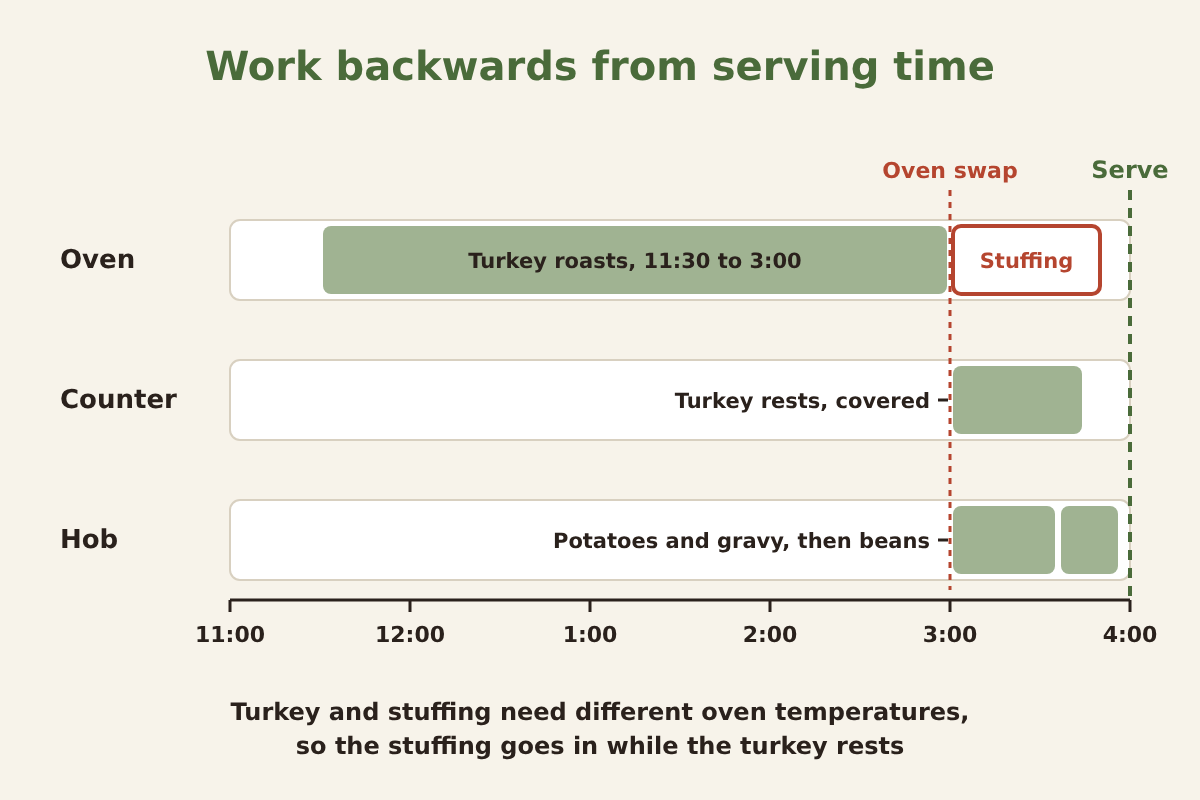
The most useful line is the warning about clashes. If the turkey and the stuffing need different temperatures, a good plan says so and moves one of them. A plan that bakes them side by side at one temperature without comment has missed the main job.
Where it goes wrong
- Cooking times it made up. Without your recipe's time, the assistant uses a typical figure for a bird or joint that size. Use the time from your recipe or the label, and judge doneness with a thermometer, not the timeline.
- Food safety figures. Don't take safe internal temperatures, thawing times or how long food can sit out from the chat. Check them with your national food safety agency, such as the UK government's guidance on how to chill, freeze and defrost food safely, or your recipe.
- Assumed oven temperatures. It may pick a temperature for each dish. Check every one against your own recipes and correct it.
- Kit you don't have. A plan can quietly need two oven shelves of the same size or a fifth burner. Count what you have and tell it.
- Units. Ask for °C or °F and kilograms or pounds to match your recipes and oven dial, so nothing gets converted in your head on the day.
The same work-backwards trick helps with smaller events too. Our guide to planning a kid's birthday party with AI uses it for a two-hour party. For the days after, there's turning leftovers into dinner.
Keep it private
A menu and a kitchen description are all the assistant needs. Leave out guests' names and anything about their health: if someone can't eat gluten or nuts, write "one guest eats no gluten" and check labels yourself, because a chat plan is not an allergy check. More on this in what you should never paste into an AI chatbot.
Tested with
We ran this prompt with OpenAI's GPT-6.2 Sol model (gpt-6.2-sol, through OpenAI's API) in November 2026 for Thanksgiving dinner for 10 at 4pm: roast turkey, stuffing baked in its own dish, mashed potatoes, green beans, gravy and pumpkin pie, one oven and four burners, a 6 kg turkey and a recipe time we gave of about 3 hours 30 minutes plus 30 minutes resting. It put the turkey in at 11:30, moved the pie to the day before so it wouldn't compete for the oven, and flagged that the turkey and the stuffing needed different temperatures, so the stuffing went in when the turkey came out at about 3:00. Potatoes and gravy started on the hob at 3:00 and the beans around 3:40. It said up front that it had assumed oven temperatures for the turkey and stuffing, and told us to use our recipes' figures instead.
We also ran it without the recipe's cooking time. The plan looked just as confident, but now it supplied its own range for a turkey that size, plus its own thawing time and a common pie temperature schedule. That's why the prompt asks for the time from your recipe or label.
