How to use AI to make a fair family chore chart
One prompt turns your list of household jobs into a weekly chore chart split fairly by time, with age-suited jobs for kids and a rotation for the jobs nobody likes.
Make a fair family chore chart
Our household is [who lives here, with the children's ages]. These jobs need doing each week, with roughly how long each takes: [list the jobs and minutes, or write "suggest the usual ones"]. [Person] can't do [job] because [reason]. Make a weekly chore chart that shares the work fairly by time, not by number of jobs. Give the children jobs that suit their age, rotate the jobs nobody likes from week to week, and keep everyone under [minutes] a day. Show it as a table with days across the top and people down the side. Under the table, list how many minutes a week each person has.
Tap a blank to fill it in, or copy it as it is.
Arguments about chores are usually arguments about fairness: who did the bins last time, and why does the dishwasher count the same as cleaning the bathroom? An AI assistant (a chat program such as ChatGPT, Claude, Gemini or Copilot) is good at the dull part of fixing that: adding up time, spreading jobs across a week and rotating the ones nobody wants. You still decide what's fair. It just gives you a draft to argue about that isn't your handwriting.
What you need
- An AI chat assistant. The free version is enough for this.
- A list of the jobs in your home and a rough idea of how long each takes. Five minutes with a notepad, or a quick family conversation, is enough. If you skip it, the assistant will suggest common jobs, but your own list makes a chart that fits your house.
- Each child's age, and anything someone can't or shouldn't do.
Step by step
- Fill in the brackets. Put minutes next to each job if you can ("dishes, 20 minutes a day; bathroom, 30 minutes a week"). The chart can only be fair by time if it knows the times.
- Send it and look at the minutes list under the table first. That's where unfairness shows.
- Adjust in plain words: "Move vacuuming from Tuesday to Saturday, we're out on Tuesdays" or "My 12-year-old wants laundry instead of dishes, swap them and rebalance." Busy week coming up, like a birthday? Say so, and lighten the load that week; our guide to planning a kid's birthday party with AI handles the party itself.
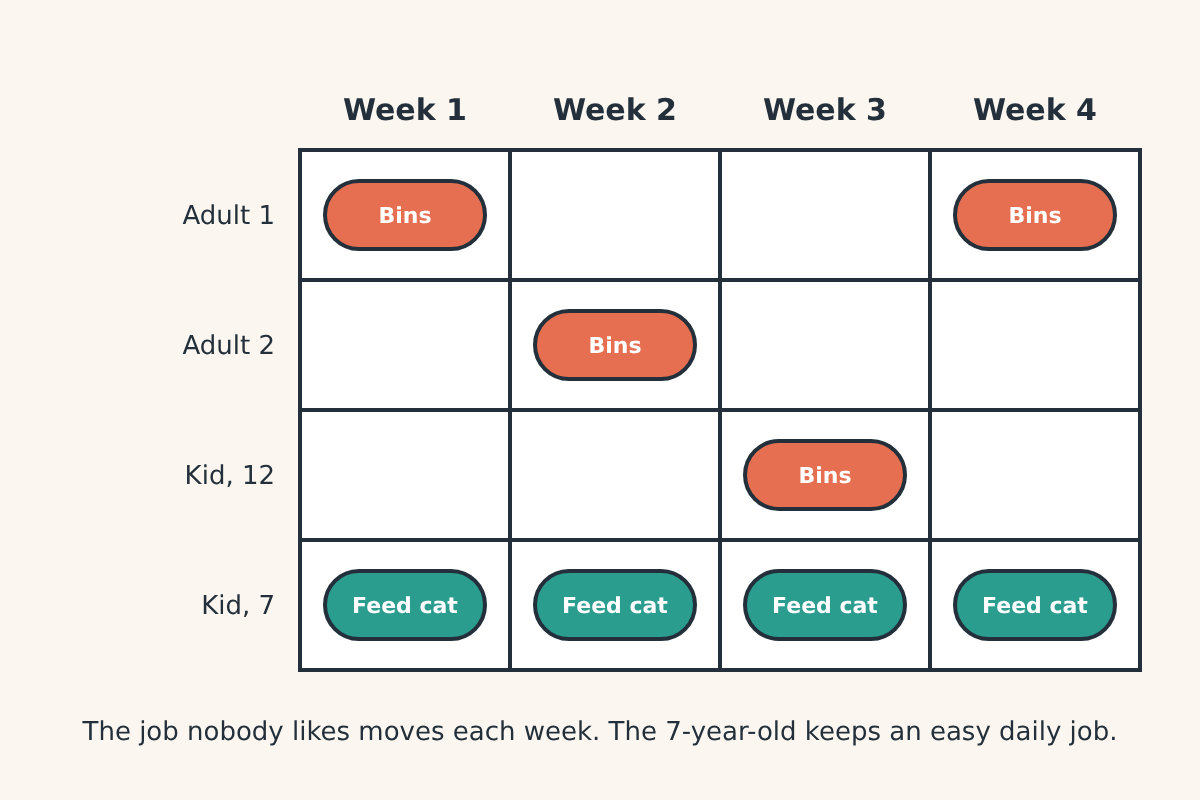
- Ask for a four-week rotation: "Show the next four weeks so the jobs nobody likes move around." This is the step that ends the "I always do the bins" argument.
- Ask for a print version: "Give me this as a simple list, one line per person per day, so I can print it for the fridge." Tables don't always paste neatly into other apps; a plain list does.
What a good answer looks like
A good chart fits on one screen, has every job you listed and nothing you didn't, and shows minutes per person that are close to each other for the adults and lower for younger children. Young children get short, safe jobs they can finish alone: feeding a pet, setting the table, putting shoes away. Older children get real jobs with a clear end, like emptying the dishwasher. Unpopular jobs (bins, bathroom, cat litter) don't sit with the same person every week.
Where it goes wrong
- The totals don't add up. Assistants make arithmetic slips, and the minutes-per-person list is where it matters. Add each person's row yourself before you call it fair.
- Jobs go missing. A job you listed sometimes drops out when the chart is revised. Read your original list against the final chart.
- Age guesses. The assistant doesn't know your child. It may give a 7-year-old a job that needs a sharp knife or cleaning sprays, or give a teenager something too babyish. You decide what's safe: keep cleaning chemicals, knives and hot appliances with the adults or older children you trust with them.
- Fair isn't the same as equal. The chart splits time. It doesn't know that one adult works nights or that exam season is coming. Tell it, and it will rebalance.
Keep it private
You don't need names. "Adult 1, Adult 2, Kid aged 12, Kid aged 7" works just as well, and first names are fine too if you want the chart to look friendlier. Leave out health details: instead of a diagnosis, describe the limit ("can't lift heavy things", "no jobs with strong smells"). Don't include your address, work schedules with employer names, or school names. For the full list, see what not to paste into an AI chatbot.
Once the chart is running, the same approach works for planning the week's dinners and the shopping list, and an assistant can also help with homework without doing it for your child.
Tested with
We ran this prompt in Claude in November 2026 for a household of two adults and children aged 7 and 12, with eight jobs: dishes, laundry, bins, vacuuming, cleaning the bathroom, feeding the cat, tidying the living room and cooking dinner. We said the 7-year-old shouldn't use cleaning sprays, and set a limit of 30 minutes a day. The chart gave the 7-year-old feeding the cat, kept the bathroom with the adults and the 12-year-old, and listed weekly minutes for each person, which we added up by hand to check. Asking for a four-week rotation moved the bins and the bathroom to a different person each week. Asking for a print version turned the table into a short list per person per day, which was easier to stick on the fridge.
